WV5-B
WV5 Basic license
WV5 Basic licence for a maximum of five automation equipment incl. 100 virtual trends that have not been created in the automation equipment, incl. extensive filter functions on views, messages and notifications
WV5 enables the convenient control, monitoring, optimisation and energy-efficient operation of all trades within buildings and distributed properties. This entails heating, sanitary technology, ventilation, air-conditioning, lighting and shading. Open interfaces allow the integration of further trades, such as facility management, hotel management, etc.
The WV5 basic modules contain all necessary individual modules for that purpose.
General
- BACnet Advanced Workstation (B-AWS)
- BACnet functions in accordance with AMEV profile MBE-A & MBE-B
- Based on SQL databases
- Tenant-capable with strict data separation
- Web-based as server client system
- Secure information transmission by means of TLS encryption
- Virtualisation on VMware and Hyper-V
- Responsive Web Design (RWD) - automatic, continuous, semantic adaptation to screen size and resolution of the respective terminal device
Technical monitoring (TMon) in plant graphics including energy monitoring (EMon)
- Scalable vector graphics (SVG)
- Web Graphics (JPG, PNG, GIF,…)
- Set points and current values
- State detection like limit values or manual intervention
- Alarm and event data
- Display and historization of BACnet and virtual trends that have not been logged in the automation equipment as well as consumption points
- Visualisation of states and time series in the form of graphics and dashboards
Operating concept
- Being integrated in the header, it enables the continuous evaluation of the plant state by means of the alarm and event state using colour coded priorities
- Interactive overview of properties with Google Maps® or OpenStreetMap®
- Intuitive menu navigation via tree structure, breadcrumbs or graphic navigation
- Search for objects, data point keys or designations for quick display or creation of groups
- Context menus
- Clipboard for the Creation of bookmarks and for the Linking or moving of objects via drag & drop
- Multiple selection and change of value
- Integrated device browser and BACnet browser
- Location and authorisation-dependent views: Overview graphics, HVAC primary plants, floor plans, room representations, tabular data point overviews
- Application of the corporate identity into the WV5 user interface
- Graphical operation of weekly and exception schedules
- Transfer of BACnet Schedule or Calendar object information from one central element to other elements of the same type by means of drag and drop
- Interactive translation of the plant identification system key as tooltip
Trends and trend profiles
- Up to 20 automatically scaled trend curves with colour selection
- Up to four Y-axes with zoom function
- Freely selectable logging period
- Adjustment of the reading interval (polling) and change of value (COV) during runtime
- Optionally customised export to e.g. median hourly values
Alarm and event management
- Current and historical
- Visual and acoustic, can be temporarily disabled
- Visible, modular instructions for action
- Categories for grouping priorities
- Acknowledgement with time stamp and user
- Navigation to related graphics/structures
- Filter function
- System messages
- Login
- Change of value and user
- Project adjustment
- Message forwarding
- Forwarding statistics
Message management
- Message processing
- User-specific processing of events
- Comments in the course of processing
- Completion, transfer and acknowledgement
- Various recipients (destinations): e-mail, SMS, app for push notifications, printer, JSON, XML, etc.
- Message profiles
- Grouping recipients
- Assignment of event categories, notification classes (BACnet) and specific alarms
- Assignment of PIK (plant identification key) -based filters, e.g. trades
- Document management
- Images, documents, archives
- Creation and assignment of instructions for action
- Attachments for e-mails
- Integrated self-monitoring (watchdog) via independent processes in the optional extension „WEBALARM“
Interfaces
- Central BACnet implementation
- S-Bus IP and S-Bus+ IP for new and existing plants
- API communication via a web interface
- M-Bus field bus for meter data logging
- Modbus communication protocol with master/slave architecture
- Connection to a central „Identity Management System“, e.g. to the „Active Directory“, available at the user‘s/customer‘s premises
- Export interface for external monitoring and historicization
- Connection of further interfaces via gateways, e.g. OPC, Hotel management software, etc.
Administration of users and tenants
- Roles as grouping of authorisations
- Optional linking of different roles with one user
- Inheritance of settings
System -> Tenant -> User - The following language packages can be set for users: German, English, Dutch, Further languages can be added in tabular form based on the UTF8 character set.
Project engineering
- Device import / update, Individual planned and time-controlled batch import
- Read out controller for project engineering off site
- Plant structure is generated automatically for the ems automation equipment, similar to programming
- Continued flexible creation and adjustment
- WEBPROJECT planning server for automatically animated planning data
- Display editor
- Creating and editing templates
- Time saving through cross-project reuse of templates, e.g. for single room control or primary plants
- Comprehensive and arbitrarily extendable SVG symbol library in 2D, DIN and 3D
- Simple creation of animated plant graphics as Vector graphics
- Offline mode for animation simulation/testing
Event Control
- Event-based overriding of defined data point groups on management level
Third party integration
Within the scope of the interoperability of WV5, compatible BACnet automation devices by other manufacturers can also be integrated into existing systems. The BACnet revisions and PICS documents provide information about compatibility. Our export sales team will be happy to answer any questions you may have about integration.
WV5 is available as a local on-premises installation or as Software as a Service in the data centre.
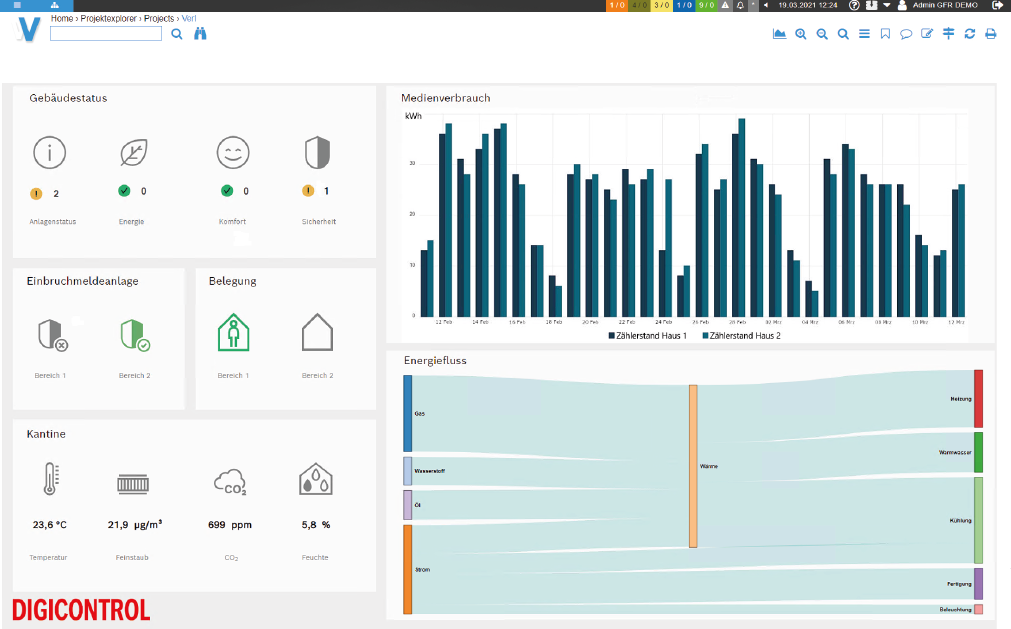
DASHBOARDS - Flexible user interface design
There are no limits when it comes to designing dashboards within WV5. All elements of WEBVISION can be brought into a common context within a view by means of the integrated graphic editor.
- Dynamic HVAC graphics
- Animated measurement values:
- Digital
- Analogue
- Multistate
- Calculated Values - Setpoint adjustment, slider and links
- Coloured text messages that flash in the event of a fault
- Alarm and event lists
- Trends and trend profiles:
- Live or historic
- Consumption and costs - Dynamic vector graphics:
- HX diagrams
- Counters and meters/clocks
- Individual representations and visualisations - Contents of external websites
The dashboards can be displayed being embedded in WEBVISION. Access can be restricted.
The display can be separated from WEBVISION and viewed on a browser-capable end device, e.g. a TV in the reception area.